

TL;DR:
- A mood tracking app records and visualizes emotional states over time to promote self-awareness and mental wellness. These tools allow quick daily logs, provide pattern insights, and often include journaling and privacy features to support emotional understanding. Choosing the right app depends on personal goals, ease of use, privacy preferences, and compatibility with your device.
A mood tracking app is a digital tool that records, organizes, and analyzes your emotional states over time to build self-awareness and support mental wellness. These apps go by several names in the mental health space, including emotional tracking apps and mood diary applications, but they all share one core function: turning your daily feelings into data you can actually learn from. Apps like DearMood, Daylio, Riley, and How We Feel have made this practice accessible to anyone with a smartphone. The result is a growing category of mood management tools that put real emotional insight in your hands, without requiring a therapist's office.
What does a mood tracking app actually do?
A mood tracking app works by giving you a fast, repeatable way to log how you feel, then surfacing patterns in that data through visual reports. Most apps take less than a minute to use per session. That low barrier is intentional and critical to the whole system working.
The core input method varies by app. Some use a color wheel, others a numbered scale, and others a grid of labeled emotions. DearMood lets users log moods with tags and time-of-day breakdowns, then displays 12 months of emotional trends in a single "Year in Pixels" calendar view. That kind of visual summary makes it easy to spot patterns you would never notice from individual entries alone.
Beyond basic logging, most emotional tracking apps include:
- Journaling tools: Text notes, photos, and voice memos that add context to a mood entry
- Visual reports: Calendar heat maps, mood spirals, and streak charts
- Activity tags: Labels like "work," "exercise," or "poor sleep" that help you connect moods to causes
- Reminders: Scheduled prompts to keep your logging habit consistent
- Privacy controls: Local device storage with no external accounts required
Privacy deserves special attention here. Apps storing data locally without external accounts protect your emotional data from third-party access. For many users, knowing their mood history stays on their device is the deciding factor in choosing one app over another.
Most mood tracking software follows a freemium model. Free core versions cover basic logging and simple reports, while premium tiers unlock advanced analytics, AI insights, and personalized recommendations. Testing the free version before upgrading is always the smarter move.
Pro Tip: Set up a home screen widget for your mood tracker. One-tap entry from your lock screen removes almost all friction and makes daily logging feel effortless.
What are the best mood tracking apps for personal growth?
The best mood tracking app for you depends on your specific goals, whether that is managing anxiety, building self-awareness, or supporting an existing therapy routine. Here is how the leading options compare.
| App | Best For | Key Features | Privacy |
|---|---|---|---|
| DearMood | Visual emotional summaries | Year in Pixels, customizable tags, time tracking | Local storage, no account |
| Riley | Creative self-expression | Mood orbs, voice memos, habit streaks, CBT-friendly | No account required |
| How We Feel | Science-backed emotion labeling | Yale-developed emotion wheel, mindfulness exercises | Standard |
| Daylio | Simple daily logging | Mood and activity logs, calendar views, freemium | Standard |
| eMoods | Mood disorder management | Symptom and medication tracking, daily highs and lows | Standard |
A few notes on standouts in this list. Riley is specifically designed to be ADHD and CBT-friendly, which makes it one of the few mood journal apps built around neurodivergent users' needs. How We Feel was created in collaboration with Yale University's Center for Emotional Intelligence, giving it a research foundation that most consumer apps lack. eMoods fills a different role entirely: it is a free mood tracker built for people managing conditions like bipolar disorder, with detailed symptom documentation that users can share directly with their care team.
Key factors to weigh when comparing options:
- Ease of entry: Can you log a mood in under 30 seconds?
- Engagement features: Does the app give you something worth coming back for?
- Depth of analytics: Does it show you trends, not just today's entry?
- Platform availability: Is it on your device and does it sync across them?
Pro Tip: If you are already in therapy, ask your therapist which format they prefer for reviewing mood data. Some therapists work directly with eMoods reports or printed calendar views from Daylio.
How do you choose the right mood tracking app?
Choosing the right mood tracking app comes down to matching the tool's complexity to your actual habits and goals. A feature-rich app you use twice a week beats a simple one you abandon after three days.
Start with these four criteria:
- Privacy policy: Read where your data goes. Apps with local-only storage and no account requirements offer the strongest protection for sensitive emotional data.
- Input speed: One-tap entry or widgets that take under five seconds significantly improve daily adherence. If logging feels like a chore, you will stop.
- Feature fit: A person tracking anxiety triggers needs activity tags and pattern reports. Someone managing a mood disorder needs symptom and medication fields. Match features to your actual use case.
- Platform and cost: Confirm the app runs on your device and check whether the free tier covers your needs before committing to a subscription.
One underrated factor is visual design. You will look at this app every day. If the interface feels cold or cluttered, you are less likely to engage with it consistently. Spend five minutes with the free version before deciding.
Pro Tip: Run two apps simultaneously for two weeks during your trial period. Side-by-side use reveals which interface you naturally reach for first, and that instinct is usually the right answer.

How to use a mood tracker to build real self-awareness
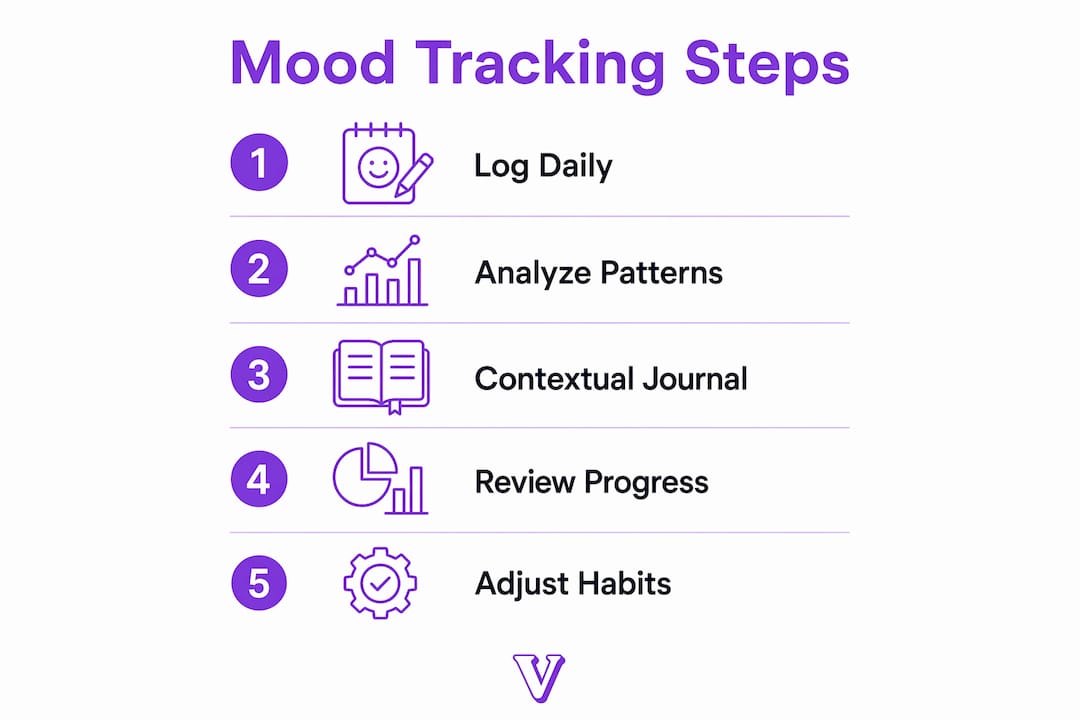
Using a mood diary application effectively requires more than just logging entries. The real value comes from reviewing your data and connecting it to your behavior. Visual tools like heat maps reveal emotional cycles that traditional journaling alone misses entirely.
Here is how to build a practice that actually works:
- Anchor your logging to an existing habit. Log your mood right after your morning coffee or before brushing your teeth at night. Habit stacking removes the need for willpower.
- Keep entries brief. A mood rating plus one activity tag takes ten seconds. Depth is optional. Consistency is not.
- Add context when something stands out. If you log a notably low or high mood, add a quick note about what happened. That context is what makes your data useful later.
- Review your reports weekly. Set aside five minutes every Sunday to look at your week's pattern. Ask yourself what the data confirms and what surprises you.
- Connect insights to action. If your data shows that poor sleep reliably precedes low-mood days, that is a behavioral target. Learning how to track your mood is only the first step. Acting on what you find is where growth happens.
The research is clear: combining journaling with visual mood summaries enhances emotional insight and drives behavioral change more effectively than either practice alone. That combination is the foundation of any serious mood improvement approach.
Patience matters here. Most users need four to six weeks of consistent logging before patterns become obvious. The first two weeks often feel like you are just collecting noise. Push through that phase.
Key takeaways
The most effective mood tracking practice combines low-friction daily logging, contextual journaling, and regular review of visual pattern reports to build genuine emotional self-awareness.
| Point | Details |
|---|---|
| Start with low friction | Choose an app with one-tap entry or widgets to build a consistent daily habit. |
| Privacy is a real factor | Apps with local-only storage protect sensitive emotional data from third-party access. |
| Match features to your goals | Simple logs suit self-awareness goals; symptom tracking suits mood disorder management. |
| Review data regularly | Weekly pattern reviews turn raw mood logs into behavioral insights you can act on. |
| Combine logging with journaling | Visual summaries plus written context reveal emotional triggers that neither method finds alone. |
What i have learned from building mood tracking into daily life
Most people approach mood tracking the wrong way. They download an app, log diligently for a week, then stop because nothing feels different yet. The problem is not the app. The problem is expecting insight before you have enough data.
At Voisley, we have seen this pattern repeatedly. The users who get the most out of emotional tracking tools are not the ones who use the most features. They are the ones who log consistently for at least a month before drawing any conclusions. That patience is rare, and it is the actual skill the practice builds.
The privacy question also gets underestimated. Your mood history is among the most personal data you generate. Choosing an app that keeps that data on your device is not paranoia. It is a reasonable boundary that makes the whole practice feel safer and more honest.
One thing that genuinely surprises most users: the data rarely confirms what they thought they knew about themselves. People who believe stress is their main trigger often discover that sleep quality or social isolation shows up more consistently in their charts. That gap between self-perception and actual pattern is where the real value of mood tracking software lives.
If you are already working with a therapist, bring your mood data to sessions. Learning to analyze your mood patterns alongside a professional multiplies the benefit of both practices. The app gives you the data. The therapist helps you interpret what it means for your life.
— Voisley
Start your emotional wellness practice with Voisley
Knowing which app to use is only part of the equation. Building the habit and understanding what your emotional data means takes structure and support.

Voisley is a mental wellness platform that combines guided journaling, mood tracking, and AI-powered insights in one private space. Whether you are just starting out or looking to go deeper with your self-reflection practice, Voisley offers structured tools including gratitude journals, shadow work prompts, and mood visualizations designed to help you understand your emotional patterns. Visit Voisley to explore the full range of mood tracking and journaling tools available, and start building the self-awareness habit that makes a measurable difference.
FAQ
What is a mood tracking app?
A mood tracking app is a digital tool that lets you log your emotional states over time and visualize patterns through reports, heat maps, and trend charts. The goal is to build self-awareness by turning daily feelings into structured, reviewable data.
Are mood tracking apps effective for anxiety?
Mood tracking apps support anxiety management by helping users identify triggers and emotional cycles that precede anxious episodes. Apps like How We Feel include mindfulness exercises alongside mood logging, adding a direct coping component to the tracking practice.
What is the best free mood tracker available?
Daylio and eMoods both offer strong free core versions. Daylio covers mood and activity logging with calendar views, while eMoods is the leading free option for users managing mood disorders like bipolar disorder.
How often should you log your mood in a tracking app?
Daily logging produces the most reliable pattern data. Apps with one-tap entry or home screen widgets make daily use realistic, since entries that take under five seconds have significantly higher adherence rates.
Is your mood data private in these apps?
Privacy varies by app. DearMood and Riley store data locally on your device with no account required, which means your emotional history never leaves your phone. Always review an app's privacy policy before logging sensitive personal data.