

TL;DR:
- A journal app with OCR converts handwritten entries into searchable, editable text, aiding organization and reflection.
- Apps like Penlo and Notewise combine OCR with AI to provide emotional insights, multi-language support, and cloud syncing.
- The effectiveness of OCR depends on handwriting, lighting, and AI sophistication, with local processing offering better privacy options.
A journal app with OCR is a digital tool that automatically converts handwritten journal entries into editable, searchable text, making personal reflections easier to organize and revisit. OCR stands for Optical Character Recognition, the industry-standard term for software that reads images of text and outputs machine-readable characters. Apps like Penlo and Notewise now combine OCR with AI models to go beyond simple text extraction, offering emotional insights, multi-language support, and cloud sync. For anyone who writes by hand but wants the search and analysis power of digital tools, this category of app solves a real problem.
What is a journal app with OCR and how does it work?
A journal app with OCR captures a photo of your handwritten page and converts it into typed text you can search, edit, and analyze. The core process runs in three steps: image capture, character recognition, and text output. Most apps then layer AI on top of that output to tag entries, suggest prompts, or surface emotional patterns.

The accuracy of any OCR system depends heavily on handwriting legibility, lighting conditions during capture, and the sophistication of the underlying AI model. Apps like Notewise use Google Gemini Vision for higher accuracy across more than 20 languages and complex handwriting styles, including cursive. That breadth matters for journalers who switch between languages or whose handwriting changes with mood or fatigue.
Penlo takes a different approach by connecting your handwritten notes directly to AI assistants. Penlo uses Google Gemini Vision and links with tools like Claude and ChatGPT, so your digitized text becomes immediately usable inside AI conversations. That integration turns a static journal entry into a live thinking tool.
Pro Tip: Photograph your journal pages in natural daylight near a window. Even the best AI model struggles with shadows and glare, and good lighting is the single fastest way to improve your OCR accuracy.
The most effective OCR journaling workflows skip manual transcription entirely. Integrated OCR search lets you retrieve any handwritten entry by keyword without ever retyping a word. That preserves the feel of handwriting while giving you the retrieval speed of a digital database.
How do top OCR journaling apps compare?
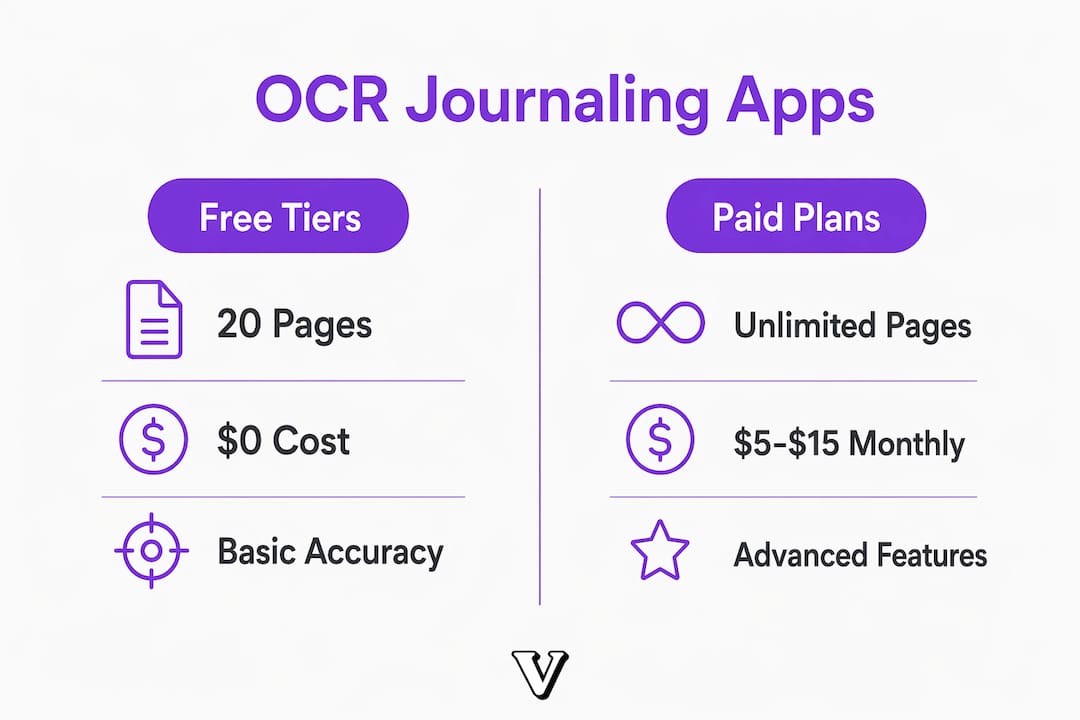
Choosing the right app comes down to three factors: how much OCR you need, what platform you use, and how much you value privacy. The market splits cleanly between free tiers with page limits and paid plans with unlimited digitization.
Free tiers typically allow about 20 OCR pages per month. Paid subscriptions range from $5 to $15 monthly for unlimited OCR access. That gap matters if you journal daily, since a single month of daily entries can easily exceed 30 pages.
Here is how the leading options stack up:
| App | Free OCR limit | Paid plan | Key feature | Platform |
|---|---|---|---|---|
| Penlo | ~20 pages/month | $5–$15/month | Claude and ChatGPT integration | iOS, Android |
| Notewise | Limited | Subscription required | Google Gemini Vision, 20+ languages | iOS (iPad focus) |
| Notebook Digitizer | Offline capture | Subscription for unlimited | Multi-language, cloud sync | Web, mobile |
Key differences worth knowing before you choose:
- Penlo is the strongest pick if you want to feed your journal entries directly into AI conversations for reflection or analysis.
- Notewise leads on language support and handwriting accuracy, making it the best fit for multilingual journalers or those with unconventional handwriting.
- Notebook Digitizer handles offline note capture well, but advanced features like unlimited digitization and multi-language support require a paid subscription and internet access.
Cloud sync is standard across all three, but it comes with a privacy tradeoff covered in the next section. Export options vary: Penlo outputs text for AI tools, while Notewise and Notebook Digitizer focus more on PDF and document formats.
What are the accuracy and privacy limits of OCR journaling apps?
OCR is not perfect, and setting realistic expectations prevents frustration. Messy handwriting and poor photo quality consistently reduce accuracy, even with advanced AI models. Disorganized layouts, crossed-out words, and low light are the three most common causes of errors that require manual correction.
Common accuracy challenges include:
- Cursive or highly stylized handwriting that AI models misread as similar characters
- Pages with heavy ink bleed or smudging from fountain pens or markers
- Entries written at an angle or on lined paper with heavy ruling
- Mixed print and cursive within the same entry
Privacy is the more serious concern. Many apps process images in the cloud for OCR, which means your most personal thoughts travel to external servers. Not all privacy-focused apps offer local-only processing. Before trusting any app with sensitive journal data, check the privacy policy for explicit language about on-device processing versus cloud upload.
Advanced AI models are beginning to close this gap. Local on-device processing can now identify objects, people, and emotional milestones in images without any cloud upload. That capability is still emerging, but it points toward a future where your journal never leaves your device.
Pro Tip: Search the app's privacy policy for the phrase "on-device" or "local processing." If those words do not appear, assume your images are processed in the cloud.
Users who keep highly personal entries, including therapy notes, grief journals, or shadow work, should prioritize apps with explicit on-device OCR commitments. The emotional value of a private journal depends entirely on it staying private.
How to use OCR journaling apps for daily self-reflection
Getting real emotional value from a digital journal with text extraction requires more than just scanning pages. The technology works best when it is part of a deliberate daily habit, not a one-time digitization project.
A practical daily routine looks like this:
- Write by hand first. Do not let the app change how you journal. Write freely, then scan. The handwriting process itself supports emotional processing in ways that typing does not.
- Scan immediately after writing. Fresh entries scanned in good light produce the cleanest OCR output. Waiting until pages stack up leads to rushed, lower-quality captures.
- Use the search function weekly. Pull up entries from the same date last month or last year. AI-powered search across digitized notes reveals emotional patterns you would never spot by flipping through a physical notebook.
- Tag entries by theme. Most apps support tags or folders. Label entries by topic, such as anxiety, gratitude, or work stress, so you can filter and compare entries across time.
- Feed key entries into an AI assistant. If your app supports it, paste digitized text into a conversation with Claude or ChatGPT and ask direct questions: "What recurring themes do you see?" or "What am I avoiding in these entries?"
- Review monthly. Set a recurring calendar reminder to read back through the month's digitized entries. This review step is where emotional clarity actually builds, not in the moment of writing.
Multi-language support adds a dimension that purely digital journals cannot match. Journalers who think in one language but write in another can capture entries in their native script and still search across all entries in any language. Notewise's support for more than 20 languages makes this practical for bilingual or multilingual users.
Organization compounds over time. A journal you can search is a journal you will actually use for self-reflection. Without search, most people abandon their notes after a few months because retrieval becomes too slow.
Key Takeaways
A journal app with OCR delivers the most emotional value when accurate digitization, searchable organization, and strong privacy controls work together.
| Point | Details |
|---|---|
| OCR accuracy depends on conditions | Good lighting and legible handwriting produce the most reliable text extraction results. |
| Free tiers have real limits | Most apps cap free OCR at about 20 pages per month; daily journalers need a paid plan. |
| Privacy requires active verification | Check for explicit on-device processing language before storing sensitive journal entries in any app. |
| Search unlocks emotional patterns | Weekly keyword searches across digitized entries reveal recurring themes that single-entry reading misses. |
| AI integration multiplies value | Apps like Penlo that connect to Claude or ChatGPT turn digitized notes into active self-reflection tools. |
OCR journaling is maturing, but the human part still leads
At Voisley, we have watched OCR journaling apps move from novelty to genuine utility over the past few years. The technology is now good enough for daily use. What still surprises people is how much the value depends on what happens after the text is extracted.
The apps that impress us most are not the ones with the highest OCR accuracy scores. They are the ones that connect digitized text to something emotionally meaningful, whether that is a search result that surfaces a forgotten entry, an AI insight that names a pattern you sensed but could not articulate, or a mood visualization that shows a three-month arc you lived through but never saw clearly.
The privacy question is one we take seriously. Cloud-based OCR is convenient, but a journal is not a to-do list. The entries people write during grief, relationship strain, or mental health struggles deserve the same protection as medical records. We expect on-device processing to become the standard within the next two years as device AI chips grow more capable. Until then, read the privacy policy before you scan a single page.
The most honest thing we can say about OCR journaling is this: the technology removes friction, but it does not create reflection. You still have to show up, write honestly, and revisit what you wrote. The app just makes sure nothing gets lost.
— Voisley
Voisley pairs naturally with your OCR journaling practice
If you already capture handwritten notes with an OCR app, Voisley is the structured space where those insights go deeper. Voisley combines mood tracking and AI insights with guided prompts across journal types including gratitude, shadow work, and future goals, giving your digitized entries a framework for real emotional growth.
Voisley's visualizations show emotional trends across weeks and months, so the patterns your OCR app surfaces in text become visible as data you can act on. The platform is private, science-backed, and built for people who take self-reflection seriously. Whether you are new to structured journaling or looking to add depth to an existing practice, Voisley gives your notes a place to become genuine insight.
FAQ
What does OCR mean in a journaling app?
OCR stands for Optical Character Recognition. In a journaling app, it converts photos of handwritten pages into editable, searchable digital text.
How accurate is OCR for handwritten journal entries?
Accuracy depends on handwriting legibility, lighting, and the AI model used. Apps like Notewise using Google Gemini Vision handle cursive and multiple languages well, but messy handwriting and poor lighting still cause errors that need manual correction.
Are OCR journaling apps private?
Not automatically. Many apps process images in the cloud, which poses privacy risks for sensitive personal data. Check the app's privacy policy for explicit on-device processing language before storing personal journal entries.
How many pages can I digitize for free?
Most apps with free tiers allow around 20 OCR pages per month. Paid plans ranging from $5 to $15 monthly typically remove that limit and unlock multi-language support and cloud sync.
Can I use a journaling app with image recognition in multiple languages?
Yes. Apps like Notewise support more than 20 languages and handle diverse handwriting styles, making them practical for bilingual journalers who write in more than one script.